 online help
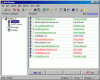
List of messages
This panel contains information about the messages, which will be sent to your recipients.
· Use Edit-Add item of the main menu or Add button on Speed Bar to add a message to the list.
· Use Edit-Delete item of the main menu or Delete button on Speed Bar to delete a message from the list.
· Use Edit-Change item of the main menu or Change button on Speed Bar to change selected message.
· Use Edit-Enabled item of the main menu or just press Space key on the keyboard to enable or disable selected message in the list.
· Use Search-Find item of the main menu or Find button on Speed Bar to Find an item in the list.
· Use Search-Find Next item of the main menu to continue searching.
For editing items in the list of messages, the form Message is used. This information is saved to a separate BML file.
See also:
· About the program
· Purpose of the program
· How to send messages
· How to work with BML
files
· User interface
· How to register
|
|
Send personalized email utilizing mailing lists! | |
 Back
to Mail Bomber online help
Back
to Mail Bomber online help